
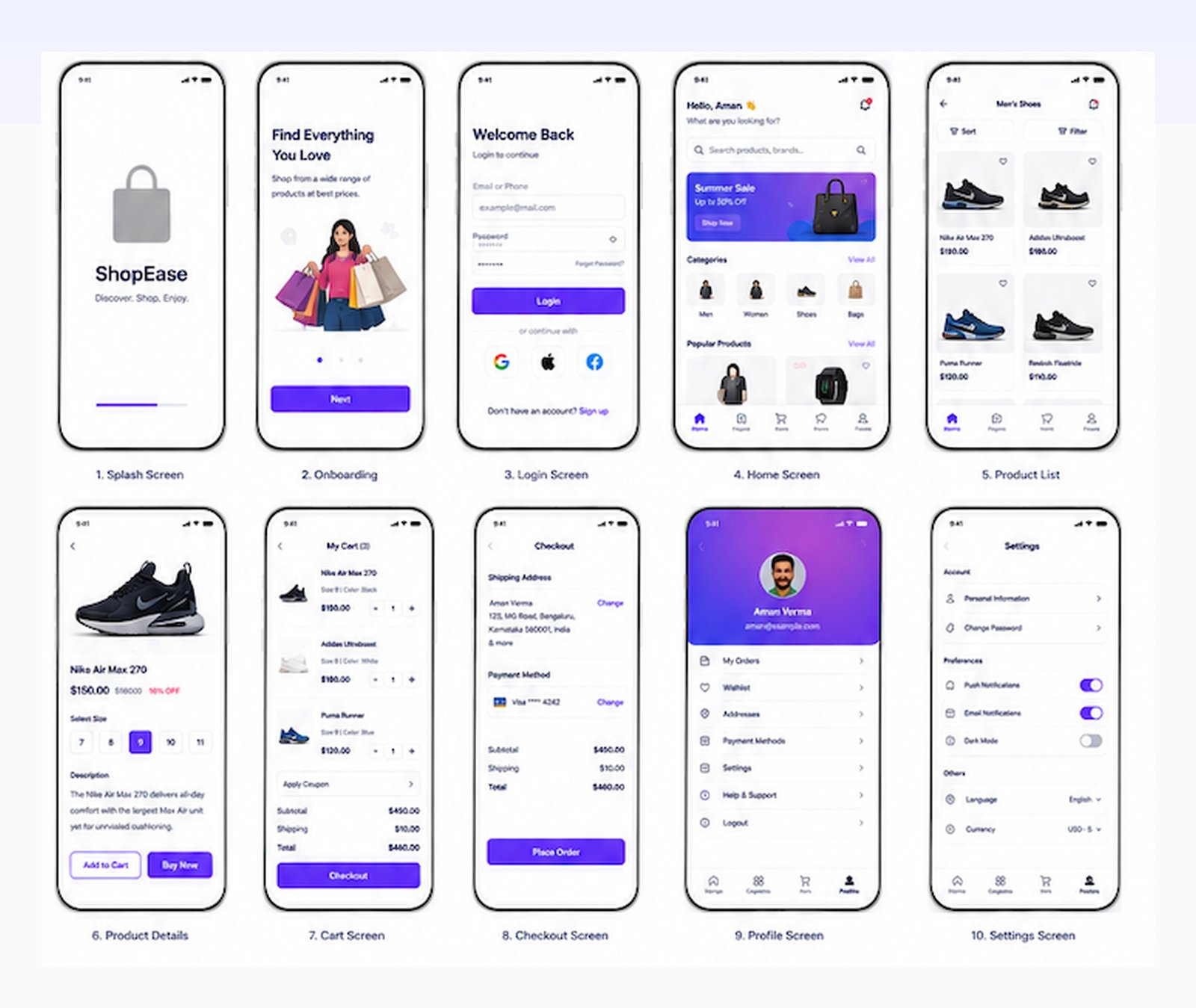
1. What Wireframes Solve: Structure Before Skin
One of the costliest mistakes startup founders and mobile product teams make is jumping straight into full-color visual design without validating information architecture. When you begin with colors, shadows, and marketing photography, team feedback gets distracted by aesthetic arguments—such as whether a button should be royal violet or magenta—rather than whether the checkout sequence is logically sound.
A wireframe serves as the architectural blueprint of your mobile application. It defines:
- Content Hierarchy: What piece of information must the user see first, second, and third?
- Navigation Patterns: How does the user progress from browsing to filtering to cart review?
- Ergonomic Layout: Are primary calls-to-action placed within easy reach of the user's thumb?
- Technical Scoping: What APIs, forms, and dynamic data states need to be built by developers?
2. Low-Fidelity vs Mid-Fidelity vs High-Fidelity
Understanding where to invest your team's energy is critical:
- Low-Fidelity (Lo-Fi): Simple grayscale boxes, placeholder shapes, and basic labels. Best for rapid ideation and testing 5 different navigation ideas in 10 minutes.
- Mid-Fidelity (Mid-Fi): Accurate component spacing, true typography hierarchies, real placeholder copy, and native mobile header/footer bars. This is the optimal sweet spot for client approval and engineering estimation. Our AI Wireframe Generator specializes in generating precise mid-fidelity layouts in seconds.
- High-Fidelity (Hi-Fi): Full brand color palettes, real photography, micro-interactions, and device frames. Once wireframes are approved, you can transition directly into our Mobile App Screen Creator to produce final App Store assets.
3. Mobile Ergonomics: The Thumb Zone & Touch Targets
With modern smartphone screens exceeding 6.7 inches, over 75% of users navigate devices one-handed using their thumb. Placing crucial action buttons in the top corners guarantees user frustration and accidental drops.
The Thumb Zone Rule: Keep primary action buttons (e.g., "Add to Bag", "Proceed to Payment", "Submit KYC") within the natural lower 40% of the screen. Reserve the top 20% strictly for passive status items and header titles.
Furthermore, follow official touch target minimums:
- Apple iOS HIG Minimum: 44 x 44 points (pt) with at least 8pt padding between clickable targets.
- Google Android Material 3: 48 x 48 density-independent pixels (dp).
4. Adhering to Apple HIG & Google Material Design 3
Designing for iOS and Android requires respecting their native interaction paradigms:
| Component / Pattern | Apple iOS HIG | Google Material Design 3 |
|---|---|---|
| Primary Navigation | Bottom Tab Bar (3 to 5 icons max) | Navigation Bar or Navigation Rail |
| Top Status & Notch | Dynamic Island & Safe Area inset | System status bar with punch-hole |
| Modal Sheets | Detented bottom sheets with grab handle | Bottom sheets with rounded top corners |
| Back Action | Left swipe gesture + top left chevron | Universal system back gesture / arrow |
5. Mapping Core E-Commerce User Journeys
When generating wireframes for an e-commerce or D2C application, avoid treating screens in isolation. Always map connected multi-screen user flows:
- Onboarding & Value Proposition: 3-screen carousel highlighting key benefits, followed by mobile number OTP entry.
- Discovery & Category Feed: Search bar with auto-suggestions, sticky promotional banners, and 2-column product listing cards.
- Product Details Page (PDP): Full-bleed image carousel, size/color variant chips, expandable return policy accordions, and sticky "Add to Bag" bar.
- Frictionless Checkout: Saved address radio cards, UPI / RuPay quick selectors, discount coupon input, and total price breakdown.
6. Preparing Wireframes for Engineering & Stakeholders
A wireframe is only as good as its handoff efficiency. When sharing wireframes with your mobile development team:
- Label Screen States: Include loading skeleton screens, empty state views (e.g., "Your Cart is Empty"), and error states (e.g., "Network Timeout").
- Document Edge Cases: Show how the layout behaves with long product titles that wrap to two lines, or international phone numbers.
- Vector Resolution: Ensure wireframes are exported at sharp 2x or 3x resolutions so engineers can inspect spacing without pixel blur.
7. How Generative AI Replaces 40 Hours of Figma Drag-and-Drop
In traditional product teams, drafting a 10-screen mobile user flow in Figma takes a UX designer 30 to 40 hours of manual layout adjustments.
With the AdShot AI Wireframe Generator, you simply input plain English user stories—such as "Create an iOS FinTech investment dashboard with total balance, portfolio breakdown donut chart, and recent SIP transactions"—and receive an aligned, ergonomic wireframe blueprint in under 30 seconds.
Pair your wireframes with our App Screen Creator and 3D Device Mockup Generator to present pitch-perfect product visions that win over clients and investors alike.